Every customer conversation. One place to reply.
Bring website chat, WhatsApp, and Instagram into one inbox. Let AI handle routine questions, automate follow-up, and hand conversations to your team when judgment matters.
14-day free trial. Cancel anytime.

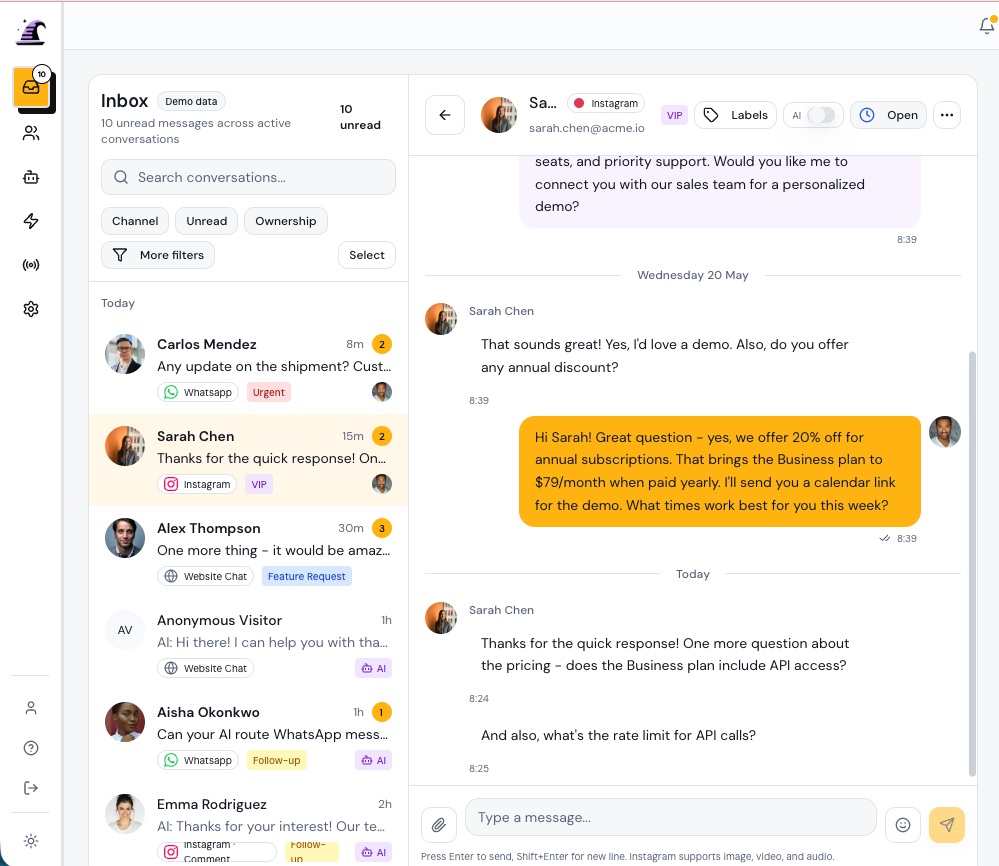
Keep connected channels in one inbox.
Manage website chat, WhatsApp, and Instagram Conversations without changing tools or rebuilding context.
See the shared inbox
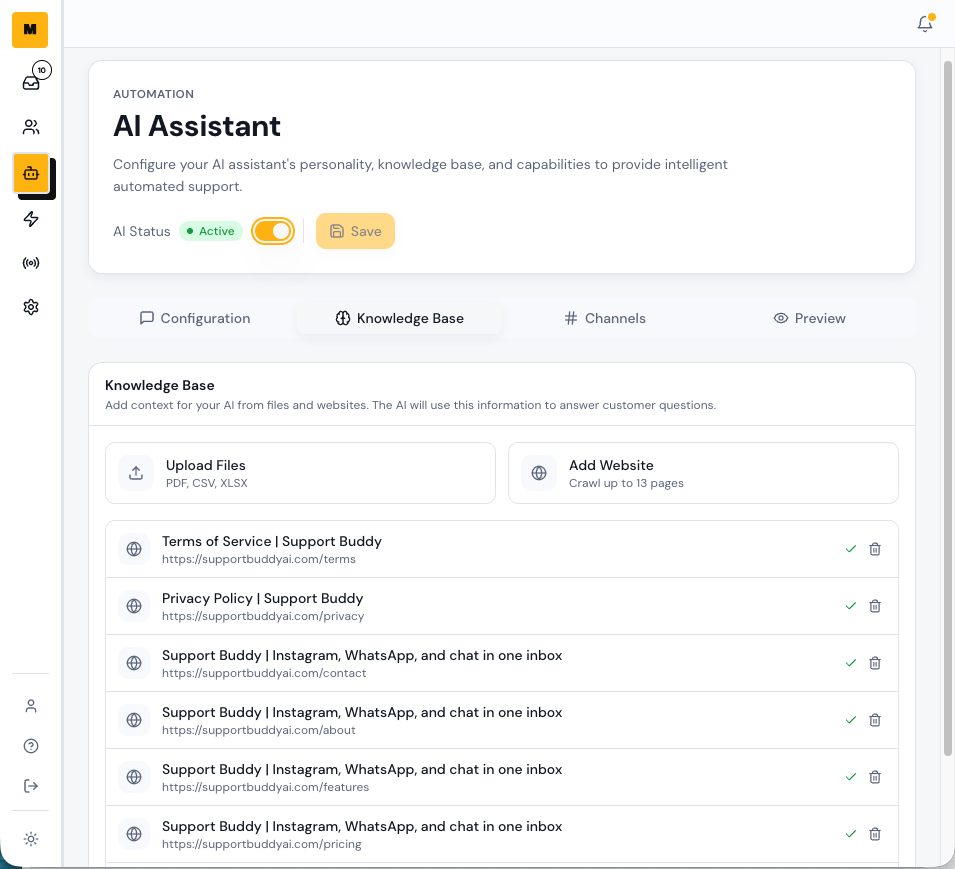
Answer routine questions with oversight.
Use your approved sources for AI replies, see what was sent, and route uncertain or sensitive questions to a Teammate.
See AI replies
Automate the follow-up you repeat.
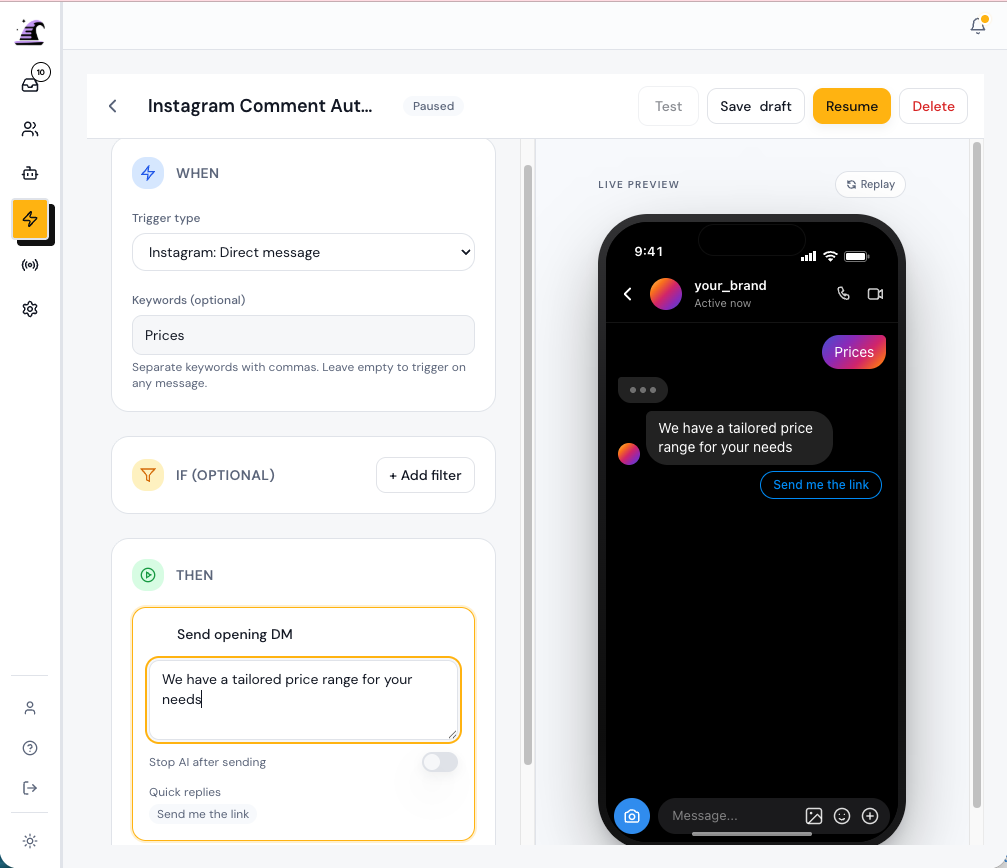
Choose a trigger, add useful response steps, collect details, and make human handoff part of the workflow.
See Automations
Take over without asking customers to repeat themselves.
The shared inbox keeps messages, automated replies, Contact details, ownership, and team notes together, so the next response starts with context.
Set up your first customer workflow in three steps.
Start with one channel and one repeatable task, then add more when the workflow is working well.
Start free trialConnect a channel.
Add website chat, WhatsApp, or Instagram to the Workspace.
Add your sources and steps.
Give AI approved information, choose what starts the Automation, and define what should happen next.
Test, publish, and review.
Check the customer path, publish when it looks right, and take over from the inbox whenever needed.
Keep customer conversations together.
Manage website chat, WhatsApp, and Instagram from the same Conversation list. Each channel keeps its identity while your team keeps one workflow.
Automate routine replies and keep people in control.
Support Buddy records when AI replied, when confidence dropped, and when a Teammate took over. The history stays visible across DMs, comments, and website chat.
- AI auto-replies from your FAQs and sources on connected channels and in automations.
- Route the Conversation to a person when confidence drops or the customer asks for help.
- See a clear AI or Teammate label on every reply.
Choose what starts the conversation and what happens next.
Build each Automation in a vertical step list and preview the customer experience as you work. Start with a customer action, then add the reply, form, tag, assignment, or handoff.
Start with intent
A new message, customer comment, form response, or chat opened on an important page.
Continue the conversation
Send a useful reply, share a link, collect details, tag the Contact, or assign the Conversation.
Built for small teams with customers everywhere.
Support Buddy helps creators, online stores, and support teams answer customers, capture useful details, and keep follow-up organized.

Creator
Answer audience questions, deliver useful resources, and keep follow-up from taking over your day.

E-commerce owner
Answer product and order questions across your channels, then step in when a shopper needs personal help.

Sales team
Capture pricing and demo interest, then assign the Conversation with the customer history intact.
Move from manual replies to a repeatable workflow.
Support Buddy connects the incoming message, automated response, and team follow-up.
 Support Buddy
Bring your customer conversations into one place.
Connect a channel, test one Automation, and see how Support Buddy fits your team during the 14-day trial.